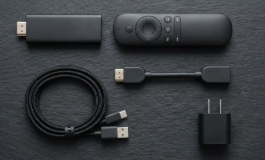

Imagine paying less than $30 for a little device that lets you watch your favorite movies, live sports, and television channels without worrying about another subscription bill. That’s what makes the EZStream Streaming Stick so tempting. You plug it into your TV, connect to Wi-Fi, and supposedly get access to all the entertainment you’ve been paying for every month. I can understand why people are interested, especially when you consider how expensive it has become to maintain several streaming subscriptions. But something about that promise doesn’t make sense. Netflix, Disney+, HBO Max, and other streaming companies don’t suddenly stop charging because you’ve connected a different device to your television. So how exactly is EZStream supposed to give you access to content that normally costs money? I looked into the product, its advertising, customer complaints, and the websites selling it. What I found is quite different from the entertainment upgrade being promised.
Quick Takeaway
- Product: EZStream Streaming Stick, also advertised as EZStream TV Box.
- Advertised price: Starting at $28.99.
- Main claim: Access live TV, movies, sports, and entertainment without monthly subscriptions.
- Setup: Connect to a television’s HDMI port and use Wi-Fi.
- Actual function: Customer-reported support information describes a screen-mirroring device, not a source of free premium subscriptions.
- Customer concerns: Misleading advertising, connectivity problems, and expensive returns.
- Checkout concern: Some EZStream sales promotions have been associated with a separate recurring membership program.
- My verdict: I wouldn’t buy EZStream expecting free premium television or a replacement for paid streaming services.
Table of Contents
- Quick Takeaway
- What Is EZStream Supposed to Do?
- Does EZStream Really Give You Free Netflix, Movies, and Live Sports?
- Is EZStream Just an Ordinary Screen-Mirroring Device?
- What I Found in EZStream Customer Reviews
- The Websites Selling EZStream Make Different Promises
- The Checkout and Refund Terms Deserve Attention
- Is the EZStream Streaming Stick Worth Buying?
- What to Do If You’ve Already Bought EZStream
- Is EZStream a Scam? My Verdict
- Tips for Shopping Safely
What Is EZStream Supposed to Do?
EZStream is advertised as a small HDMI streaming stick that can turn an ordinary television into a smart entertainment system. The websites selling it say you can connect the device to an HDMI port, plug in its power cable, connect to Wi-Fi, and start watching movies, sports, news, and television channels. Some versions of the advertising promise 4K video at 60 frames per second, HDR10 support, dual-band Wi-Fi, and a setup process that takes about three minutes. Those are fairly ordinary features for modern streaming hardware. What makes EZStream different is the claim that you can enjoy all this entertainment without monthly subscription fees. One promotional website even suggests that buying the stick can eliminate expensive cable bills forever. But the seller doesn’t provide a proper list of the channels and services included with the device, and that’s a serious omission. If I’m buying something because it promises thousands of channels, I should be able to find out exactly what those channels are before paying. Instead, the advertising spends more time talking about how much money buyers will supposedly save.
Does EZStream Really Give You Free Netflix, Movies, and Live Sports?
This is where the advertising falls apart for me. A streaming stick doesn’t own the movies, television shows, or sports broadcasts people want to watch. It simply provides a way to access or display content. Services like Netflix and Disney+ still control access to their libraries, and live sporting events are often covered by broadcasting agreements. Buying a different HDMI device doesn’t remove those restrictions. EZStream could potentially give users access to free streaming services, publicly available channels, or content they already subscribe to, but that’s very different from providing free access to everything. The seller hasn’t shown which premium services are legally included, what content is available without an account, or how long any particular channel will remain accessible. I also found a customer complaint on Trustpilot that included what the reviewer said was a response from EZStream support. According to that response, the device doesn’t provide built-in TV channels or streaming subscriptions. Instead, it mirrors content from a compatible phone, tablet, or computer, and some streaming apps still require an active paid subscription. That’s an important distinction. If you already have Netflix on your phone, a compatible casting device might help display it on a television, subject to the app’s restrictions. It doesn’t give you Netflix for free. And if you don’t have a subscription in the first place, EZStream isn’t going to create one for you.
Is EZStream Just an Ordinary Screen-Mirroring Device?
From the customer-reported support explanation, screen mirroring appears to be a much more realistic description of at least some EZStream devices being sold. Screen mirroring allows you to display content from a phone, tablet, or computer on a larger screen. It’s useful for showing photographs, presentations, certain videos, and other compatible content, but it isn’t new technology. Many smart TVs already have built-in casting features, and there are plenty of inexpensive wireless display adapters that perform similar functions. There’s also a difference between a screen-mirroring receiver and a proper streaming platform such as Roku or Google TV, where users can install supported applications directly on the device. The EZStream advertising isn’t consistent enough for me to confirm that every version being sold has the same hardware or software. Some sales pages describe a sophisticated standalone streaming system with a quad-core processor, while the customer-reported support message says the device cannot install apps directly. Those are very different capabilities. I wouldn’t assume the impressive technical specifications on one website apply to the device shipped by another seller using the EZStream name. If all you receive is a basic mirroring adapter, the product might still work for certain tasks, but it won’t deliver the subscription-free entertainment experience being advertised.
What I Found in EZStream Customer Reviews
The independent customer feedback I found is much less encouraging than the testimonials on the sales pages. A September 2026 Trustpilot reviewer said she bought three EZStream devices and was told she would need to return them to China to receive a full refund. She also shared the support explanation about screen mirroring and the absence of built-in streaming subscriptions. That’s particularly revealing because it goes directly against the impression created by advertisements promising instant access to television channels. Other complaints associated with EZStream promotions describe devices that wouldn’t connect properly, products that didn’t match buyers’ expectations, and sellers offering partial refunds instead of straightforward returns. I wouldn’t treat every complaint as proof that all EZStream devices are defective, especially when the product appears across different websites and sellers. But these experiences raise questions about what buyers are actually receiving. Meanwhile, one EZStream promotional site advertises a 4.89-star rating from more than 1,840 verified reviews, while another claims 4.88 stars from over 1,920 customers. I couldn’t independently confirm those figures. The websites also display polished testimonials about customers saving thousands of dollars on cable bills, but those stories don’t establish that the device provides legitimate free access to premium entertainment. I’d give much more weight to a detailed demonstration of the actual device than to another glowing review on a sales page.
The Websites Selling EZStream Make Different Promises
Another thing I noticed is that EZStream isn’t being presented through one clearly identifiable storefront. Websites including Tryezstream.com, Ezstreamofficial.com, and Theezstream.com advertise the product with very similar language, prices, and promises. Some call it a streaming stick, while others describe it as a TV box or entertainment hub. They also use different customer review totals, despite promoting what appears to be the same branded product. One website lists the device at $28.99, reduced from $57.92, while encouraging customers to claim a discount of up to 70%. Another offers bundles of two devices for $39.98 and three for $52.98. The larger discounts apply to multiple units, not necessarily to someone buying one stick. The advertising also makes broad promises about compatibility and uninterrupted streaming, but the actual experience will depend on the hardware, your internet connection, and the content source. I don’t see a convincing reason to buy several units before confirming what one actually does. And when different websites make such sweeping promises under the same product name, buyers need to be especially careful about which seller they’re paying and whose return policy applies.
The Checkout and Refund Terms Deserve Attention
Some EZStream promotions have also been linked to a retailer called Inovira Home, which operates a separate paid membership program. That membership has been advertised at monthly prices ranging from $37.99 to $49.99, depending on the offer. It’s important not to confuse this with the device itself. I haven’t established that every EZStream purchase automatically includes the membership, and Inovira Home has offered a guest checkout option. But anyone ordering through an associated sales page should check carefully for recurring charges before completing payment. A $49.99 monthly membership would cost $599.88 over twelve months, which is a lot of money to spend after being attracted by a $28.99 gadget. Other EZStream websites advertise a 60-day money-back guarantee, although shipping and handling charges may be excluded. Ezstreamofficial.com identifies Langley Retail as the merchant handling its guarantee and provides a support email for return requests. That doesn’t necessarily mean the same policy applies to purchases through other sellers. The Trustpilot complaint about returning devices to China also shows why the actual return destination matters. A guarantee sounds generous until you discover that getting your money back requires expensive international postage. I would check the final payment amount, merchant name, recurring-payment terms, and return address before ordering anything.
Is the EZStream Streaming Stick Worth Buying?
I don’t think it is, at least not for the reason it’s being advertised. If you want a device that mirrors content from your phone to a television, there are established alternatives, and your TV may already support that feature. If you want to turn an older television into a smart TV, a recognised streaming device with a proper operating system and supported apps makes more sense. You can also access legitimate free, ad-supported entertainment through services such as Pluto TV, Tubi, and other platforms where available, without buying a mysterious stick that promises unlimited premium content. What I wouldn’t do is spend money on EZStream because an advertisement suggests I can stop paying for Netflix, sports subscriptions, and cable television forever. The seller hasn’t shown how those paid services are included, and the customer-reported support response suggests they aren’t. Even at $28.99, a product isn’t good value if it doesn’t perform the job you bought it for.
What to Do If You’ve Already Bought EZStream
Start by checking your payment confirmation to see which company charged you and whether you agreed to any recurring membership. If there’s a membership you don’t want, contact the merchant to cancel it and keep written confirmation. When the device arrives, check whether it actually provides standalone streaming apps or only mirrors content from another device. If it doesn’t match the description you relied on when ordering, save screenshots of the advertisement and contact the seller about a refund. Don’t send it to an international return address without first checking the postage cost and obtaining the return instructions in writing. If you were charged unexpectedly or the seller won’t resolve a legitimate complaint, contact your payment provider about the dispute options available to you.
Is EZStream a Scam? My Verdict
I wouldn’t say every EZStream device is fake or that nobody receives a working product. A screen-mirroring receiver is a real piece of hardware, and it can be useful when bought for the right purpose. But I do think the advertising gives buyers a misleading impression of what they’re getting. There’s a big difference between a device that displays content from your phone and one that supposedly unlocks paid movies, live sports, and television channels without subscriptions. EZStream’s promotional material blurs that difference, while the customer complaints and varying sales arrangements make the purchase even less appealing. I wouldn’t recommend buying it through these advertisements. If you’re hoping to replace your streaming subscriptions with one inexpensive stick, EZStream hasn’t shown that it can do that.
Tips for Shopping Safely
- Check what the device actually does. Before buying EZStream or a similar streaming stick, find out whether it supports streaming apps directly or simply mirrors content from your phone. Don’t assume it comes with free TV channels just because the advertisement says so.
- Be careful with promises of free premium content. A streaming device doesn’t automatically unlock Netflix, Disney+, or paid sports channels. If a seller claims otherwise, look for a clear explanation of which services are included and how they’re provided.
- Look for independent customer reviews. Don’t depend entirely on testimonials displayed on the seller’s website. Search for feedback from actual buyers, particularly about delivery, device performance, and refunds.
- Check for hidden charges and subscriptions. Review your cart before paying to make sure you haven’t accidentally selected additional products or signed up for a recurring membership. Pay attention to the final amount, not just the advertised price.
- Read the return policy carefully. Find out whether you can return the device after testing it, who pays return postage, and where the product must be sent. An international return can cost more than the device itself.
- Use a payment method with buyer protection. A credit card or another payment service with a dispute process may give you options if the product never arrives or is significantly different from what was advertised. Keep your receipt, order confirmation, and screenshots of the original offer.
- Trust your instincts. If an offer sounds too good to be true, it probably is. A $30 streaming stick promising unlimited access to movies, live sports, and premium TV channels without subscriptions should make you question what’s really being sold. Don’t let huge discounts, countdown timers, or claims of limited stock pressure you into buying something you’re unsure about.
You can check out my review of WaveMax TV Channel here.