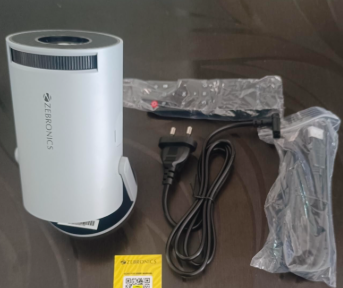

I bought the Zebronics PixaPlay 73 hoping for a decent budget home theatre setup, something I could just plug in, mirror my phone to, and relax in front of on weekends. The price looked good for what you’re supposedly getting, 4K support, a built in speaker, Android smart features. But after actually living with it for a while, the day to day experience has been pretty frustrating, and I think it’s worth laying out exactly why.
Quick Takeaway on the Zebronics PixaPlay 73
- Big screen experience, up to 130 inches, for a fraction of what an equivalent TV would cost
- Android smart features and dual band WiFi make streaming and phone mirroring easy
- Built in speaker is fine for casual nights, no need for extra gear most of the time
- Heats up noticeably after about an hour of continuous use
- Remote response is slow, sometimes 20 to 30 seconds to register a button press
- Picture clarity is good for the price, but doesn’t fully match how sharp the spec sheet makes it sound
Table of Contents
- Quick Takeaway on the Zebronics PixaPlay 73
- What Is the Zebronics PixaPlay 73?
- Setting It Up: First Week
- A Month In: Where the Cracks Started Showing
- What I Loved About PixaPlay 73
- What I Didn’t Love
- How Zebronics PixaPlay 73 Compares to My Old Projector
- Who This Isn’t For
- Who This Is Actually Good For
- Final Verdict
What Is the Zebronics PixaPlay 73?
The PixaPlay 73 is a budget Android smart LED projector. It’s rated at 3700 lumens brightness, with a native resolution of 1280×720 and support for up to 4K input. It runs a quad core processor with 1GB RAM and 16GB storage, has dual band WiFi and Bluetooth 5.4, a 200 degree tilt mechanism, and a bundled remote. The lamp is rated for 30,000 hours of use.
Setting It Up: First Week
Out of the box, setup was straightforward, plug in power, connect to WiFi, sign into the apps I wanted. The 200 degree tilt mechanism meant I wasn’t stuck finding one perfect spot facing a flat wall, I could angle it from a shelf across the room without much fuss. First impressions were good: the picture size alone, once I had it dialed in, made my regular TV feel small by comparison.
A Month In: Where the Cracks Started Showing
This is where the heating and remote issues became impossible to ignore. On any night where I wanted to watch something longer than an hour, the unit would noticeably heat up, and I started instinctively building in a pause around the hour mark just to let it cool rather than pushing through. The remote lag also became a running annoyance, pressing a button and waiting 20 to 30 seconds for it to register makes basic menu navigation more tedious than it should be on a device this price.
What I Loved About PixaPlay 73
The screen size is the real selling point. At up to 330cm (130 inches), you’re getting a projection size that would cost significantly more in an equivalent TV. For movie nights and sports, the sheer scale makes a real difference.
Android smart features are genuinely convenient. I can mirror my phone or stream directly without plugging in a separate stick or laptop, and the dual band WiFi has held up without the dropouts I half expected at this price point.
Setup flexibility, thanks to the tilt mechanism. Not being locked into one exact spot in the room is a bigger deal than it sounds, especially if you’re not mounting it permanently.
The built in speaker is good enough. I haven’t felt a strong need to connect an external speaker for regular viewing, though it’s not going to replace a real sound system if that matters to you.
What I Didn’t Love
Heating during longer sessions. Anything beyond an hour of continuous use and the unit gets noticeably warm, which isn’t ideal if you’re planning on long movie nights or gaming sessions back to back.
The remote is slow. A 20 to 30 second lag on button presses turns simple navigation into a waiting game, and it’s the single most annoying part of day to day use.
Picture clarity doesn’t fully match the spec sheet. The native resolution is 720p even though it supports 4K input, and in practice the image isn’t quite as crisp as the brightness and resolution numbers on the listing suggest. It’s acceptable for the price, just don’t expect sharpness in line with higher end projectors.
General responsiveness has occasional lag. Menu navigation and app switching aren’t always snappy, there’s a noticeable delay in spots where I’d expect instant response.
How Zebronics PixaPlay 73 Compares to My Old Projector
I was previously using a cheaper, no-name LED projector in roughly the same price bracket, and the PixaPlay 73 is a step up in screen size and smart features, Android support and app access alone make it more convenient day to day. But my old unit, despite worse picture quality overall, didn’t have the same heating issue over long sessions. It’s a trade-off rather than a clean upgrade across the board.
Who This Isn’t For
- Anyone wanting back-to-back long movie nights or extended gaming sessions without breaks, the heating will get in the way
- Anyone who relies heavily on quick remote navigation, menu-heavy apps will feel sluggish
- Anyone expecting sharp, native 4K-level clarity, the native panel is 720p, and 4K support doesn’t fully close that gap
- Anyone planning permanent, fixed-position mounting where the tilt flexibility isn’t a selling point for them anyway
Who This Is Actually Good For
- Casual viewers who want a big screen for movies and shows without TV-level spending
- Anyone who wants simple Android smart features without extra streaming devices
- People watching in shorter sessions rather than marathon viewing blocks
- Buyers who’ve set price as the priority over best-in-class picture sharpness
Final Verdict
After three months, the Zebronics PixaPlay 73 earns its price with genuine upsides, screen size, smart features, and setup flexibility, but it comes with real trade-offs, heating on longer sessions, a sluggish remote, and picture clarity that’s good rather than great. It’s not the all-positive or all-negative story either extreme makes it sound like. If you know what you’re trading off going in, it’s a reasonable buy for the price. If you need long, uninterrupted sessions or sharper picture quality, it’s worth looking at projectors a tier up instead.
Read Also >>> Sensica Sensilight Mini Review: Is It Really Worth $259?